Deploy the server
Everything a server starts with is an environment variable. This page keeps them in one file, checks the file before a start, and hands the same file to every command, so the server and the commands run beside it always agree on where the data is and who may sign in.
One file of settings
The template has every setting VectrixDB reads, grouped: the server, keys for
scripts, sign-in, single sign-on, email, the brand, documents, audit and
evaluation, storage, and the cache. Each has a line saying what it does, and
each starts commented out, so the file changes nothing until you uncomment a
line. Secrets are left empty. Put them in the platform's secret store and name
the file it mounts with the setting's _FILE twin, or have the platform set
them in the environment.
A line is NAME=value. # starts a comment, a leading export is allowed,
and a value may be in single or double quotes. What the environment already
sets wins over the file, so a secret the platform injects is never replaced by
a stale line in it. A line that is not NAME=value stops the command with
the file's name and the line's number, and a name VectrixDB does not read is
a warning from the check below. Every setting, with what it does, is also in
the settings reference.
Check it before a start
Settings for ./vectrixdb_data, from vectrixdb.env and the environment

  ok     Storage      vectrixdb_data does not exist yet, and will be made at the first start
  ok     Sign-in      email, for https://vectors.example.com
  ok     Sign-in      Sign-in state is kept in SQLite file vectrixdb_data/auth/signin.db
  ok     Access log   Written to the server's output, for the platform to collect
  ok     Brand        Acme
  warn   Settings     VECTRIXDB_CORS_ORIGIN is not a setting VectrixDB reads. Did you mean VECTRIXDB_CORS_ORIGINS?
  warn   Email        No mail server, so sign-in links are not sent. Make each one on the server: vectrixdb people reset <address>
  warn   Sign-in      No admin yet, and the sign-in file is made at the first start. Then add the first: vectrixdb people add you@company.com --role admin

No errors, 3 warnings. Ready to start.
It reads the settings through the server's own code, so an error is what a
start would refuse, or what would break once it runs: a sign-in secret that is
too short, a secret given both inline and as a file, * for the allowed
origins while sign-in is on, a number that is not one, a storage backend
missing its address, an access log that cannot be written. A warning is what
would start and then surprise you, like a misspelt name, which does nothing at
all. Errors come last, and the command exits 1 while there is one, so it can
gate a deployment pipeline.
What reads each kind of file
A reader that is missing stops nothing at a start. The first file that needs it is refused, as a 503 from the upload. So the check says, under Extraction, who reads each kind of file this server is sent, and how to have one read that nothing reads:
  ok     Extraction   PDFs with a text layer, Word, Excel, PowerPoint, OpenDocument, RTF, HTML, Markdown, CSV and text files are read here by the built-in readers
  ok     Extraction   YouTube addresses are read with yt-dlp 2025.9.26
  warn   Extraction   Nothing reads scanned PDF pages here: a page with no text is left out, and a PDF of scans alone is refused. To read them, set VECTRIXDB_EXTRACTOR_URL to an extraction service that has AZURE_DOCINTEL_ENDPOINT and AZURE_DOCINTEL_KEY
  warn   Extraction   Nothing reads pictures here. pip install 'vectrixdb[ocr]', or set VECTRIXDB_EXTRACTOR_URL to an extraction service that has AZURE_DOCINTEL_ENDPOINT and AZURE_DOCINTEL_KEY
  warn   Extraction   Recordings are read here by faster-whisper, and the first one downloads its base model from Hugging Face while its upload waits. Fetch it ahead: python -c "from faster_whisper import download_model; download_model('base')"
  warn   Extraction   Nothing reads videos here: the video reader finds ffmpeg through imageio-ffmpeg, which is not installed, and does not use the ffmpeg on PATH without it. pip install 'vectrixdb[video]', or set VECTRIXDB_EXTRACTOR_URL to an extraction service that has the ffmpeg extra, AZURE_SPEECH_ENDPOINT and AZURE_SPEECH_KEY
| Kind of file | Read on this server by | Extra |
|---|---|---|
| PDFs with a text layer, Word, Excel | the built-in readers | documents |
| PowerPoint, OpenDocument, RTF, HTML, Markdown, CSV, text | the built-in readers | none |
| Scanned PDF pages | nobody; an extraction service with Document Intelligence | none |
| Pictures | RapidOCR, whose models come with it | ocr |
| Recordings | faster-whisper, whose model is downloaded the first time | asr |
| Videos | ffmpeg through imageio-ffmpeg for the sound, then faster-whisper | video |
| YouTube addresses | yt-dlp, in the library and an extraction service | youtube |
The machine is asked, and nothing is changed. Each package is imported, the
one way to know a binary wheel works here, so a package installed that does
not import is an error with the reason, libGL.so.1 missing say. ffmpeg is
run with -version and a ten-second timeout, the one imageio-ffmpeg would
pick: IMAGEIO_FFMPEG_EXE, then its own, then conda's, then the one on PATH.
One there that does not run is said, and none that runs is an error. The
speech model is looked for in the Hugging Face cache and never fetched;
with VECTRIXDB_OFFLINE set, a model that is not there means nothing reads
recordings, and the warning gives the command to fetch it where there is a
network. See Run without a network.
A file type VECTRIXDB_EXTRACTOR_ROUTES sends to an extraction service is said
to go there, and the rest of its kind is named. With no routes set, the server
sends .pdf, .docx, .doc, .png, .jpg, .jpeg, .wav, .mp3, .m4a
and .mp4, so a .tiff or a .mov is still read here, or by nobody.
When the settings of an extraction service are there, the check says what one
started with them reads with, since vectrixdb serve reads none of them:
Document Intelligence for pictures and scanned pages, Azure Speech for
recordings, the chat model and Azure Vision that describe pictures, and
Translator. What would stop it at its start is an error, a Speech address that
is not https say. What it starts without and shows at the first file is a
warning: one setting of a pair without the other, a deployment with no key
and no azure-identity for the managed identity, a Translator key with no
region.
The masking engine is held to the same, under Masking: presidio with a
language whose spaCy model is not installed fails the first document masked,
and the check says so before.
Then try every part of it
check reads the settings and opens nothing. doctor runs the same check,
then tries each part for real: it loads the models and embeds a word, reads a
small document of each built-in kind, and asks every service the settings name
whether it is there.
VectrixDB doctor, for ./vectrixdb_data

  ok     Install    VectrixDB 2.2.0 on Python 3.12.7
  ok     Models     Embedding model loads and embeds, 384 dimensions, 378 ms
  ok     Models     Reranker loads and scores, 283 ms
  ok     Readers    Markdown, HTML, Plain text: read
  ok     Sign-in    The identity provider at login.microsoftonline.com answers, 212 ms
  ok     Sign-in    Its 6 signing keys read
  warn   Extraction Nothing reads recordings here. pip install 'vectrixdb[asr]', or set VECTRIXDB_EXTRACTOR_URL to an extraction service that has AZURE_SPEECH_ENDPOINT and AZURE_SPEECH_KEY
  error  Documents  The extraction service at extract.company.com cannot be reached: the name does not resolve
                    Check VECTRIXDB_EXTRACTOR_URL, and that this machine can reach extract.company.com (a firewall, a private endpoint, a proxy).

1 error, 1 warning. Each says what to do under it.
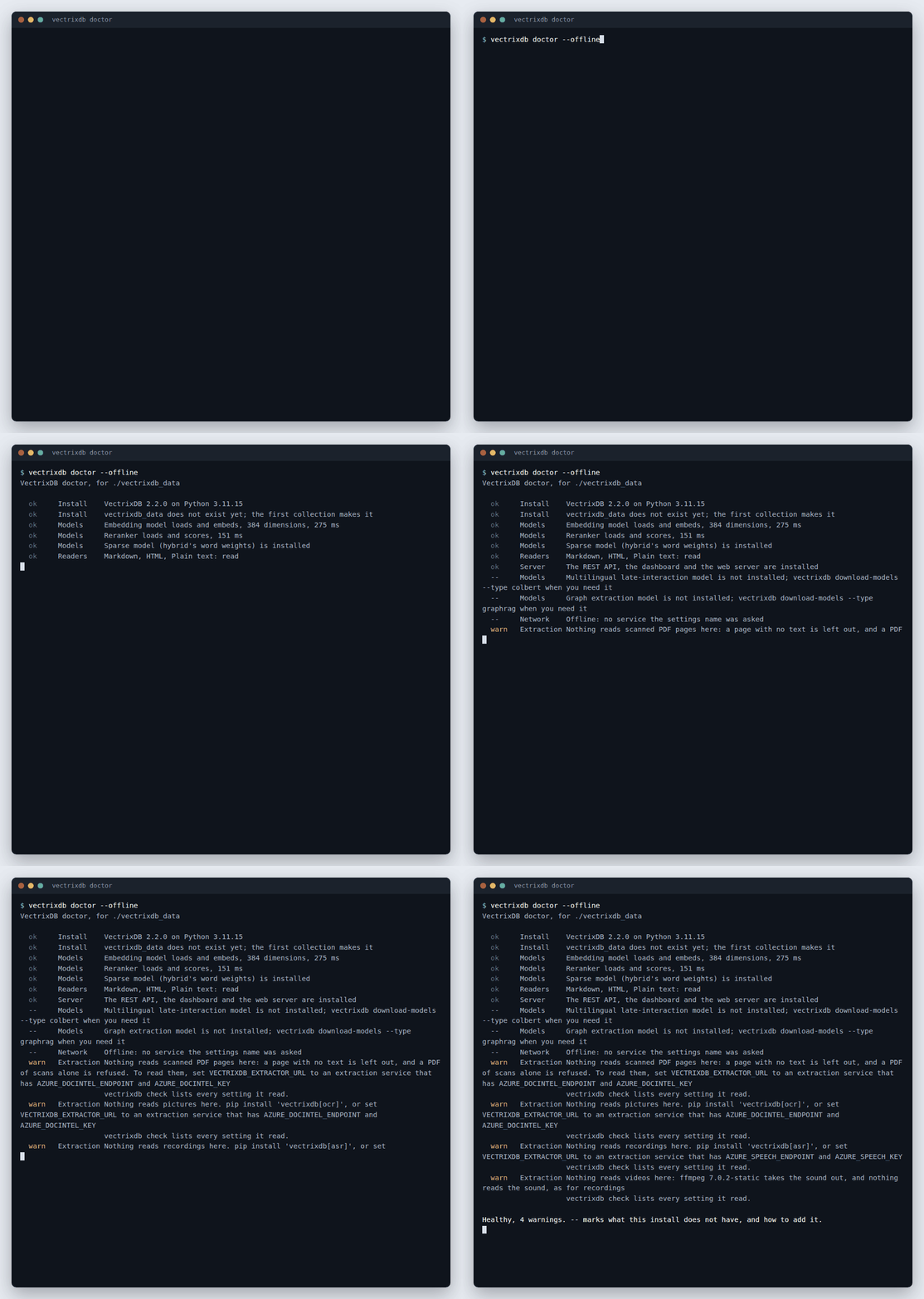
On a fresh install with no settings, offline, every part it can try answers:
| It tries | How |
|---|---|
| The data folder | writes a file and removes it, and reads the free space |
| The models | loads the embedding model and the reranker, and times one answer from each |
| The readers | reads Markdown, HTML and text; which other readers are installed comes from check |
| Sign-in | reads the identity provider's description and signing keys, and checks it calls itself the issuer you set |
| The services | the extraction service's /health, the mail server, the stores, the chat models, the masking service, the trace collector |
It changes nothing anywhere: a service is asked a GET, or for a connection
with nothing sent. A key is never printed, and an address shows only its host,
since a database address can hold a password. --offline, or
VECTRIXDB_OFFLINE=1, leaves the network out; --quick leaves the models
unloaded; --json prints the result for a pipeline. It exits 1 while there
is an error.
Every command reads the same file
vectrixdb serve --env-file vectrixdb.env --host 0.0.0.0
vectrixdb people add ada@example.com --role admin --env-file vectrixdb.env
vectrixdb evaluate policies --golden golden.jsonl --env-file vectrixdb.env
Every command that opens the data or the list of people takes --env-file,
and every one finds the data the same way: --path when given, else
VECTRIXDB_PATH, else ./vectrixdb_data. So the admin added on the server's
machine is added to the list that server reads, and an evaluation run is saved
where its Evaluate page looks, which is VECTRIXDB_EVALUATIONS when that is
set.
Logs the platform keeps
App Service, Container Apps, ECS and Kubernetes keep what a server writes to its output, and a file on a container's disk goes with the container. Send the access log there:
Each line is marked "log": "vectrixdb.access", so a query in the platform's
log viewer finds them among everything else. The server keeps no copy, and
its Access page says where to read it instead. See
Sign people in for what a line holds.
What the browser is held to
The dashboard runs no inline script, and its security policy refuses all of
it. The one script from another host is the chart library, from
cdnjs.cloudflare.com, pinned by its hash, so a copy changed on the CDN is not
run. Two things follow for a deployment:
- A proxy must not add script to the page. Some corporate proxies and monitoring agents inject an inline script into every page they pass on. The policy refuses it and the dashboard works on without it.
- Where the CDN is blocked, only the graph goes. The Graph tab says the library did not load. Every other page is served by the server itself.
Behind Azure API Management, AWS API Gateway or any reverse proxy, two more
settings matter: the path the app is served under, and whose
X-Forwarded-For says who is calling. See
Put it behind a gateway.
Calls from other sites need their origins named in VECTRIXDB_CORS_ORIGINS,
and with sign-in on, * is refused at the start. To show the dashboard inside a
portal, name the portal in VECTRIXDB_FRAME_ANCESTORS. The rest of what every
reply carries is in Sign people in.