Collection policies
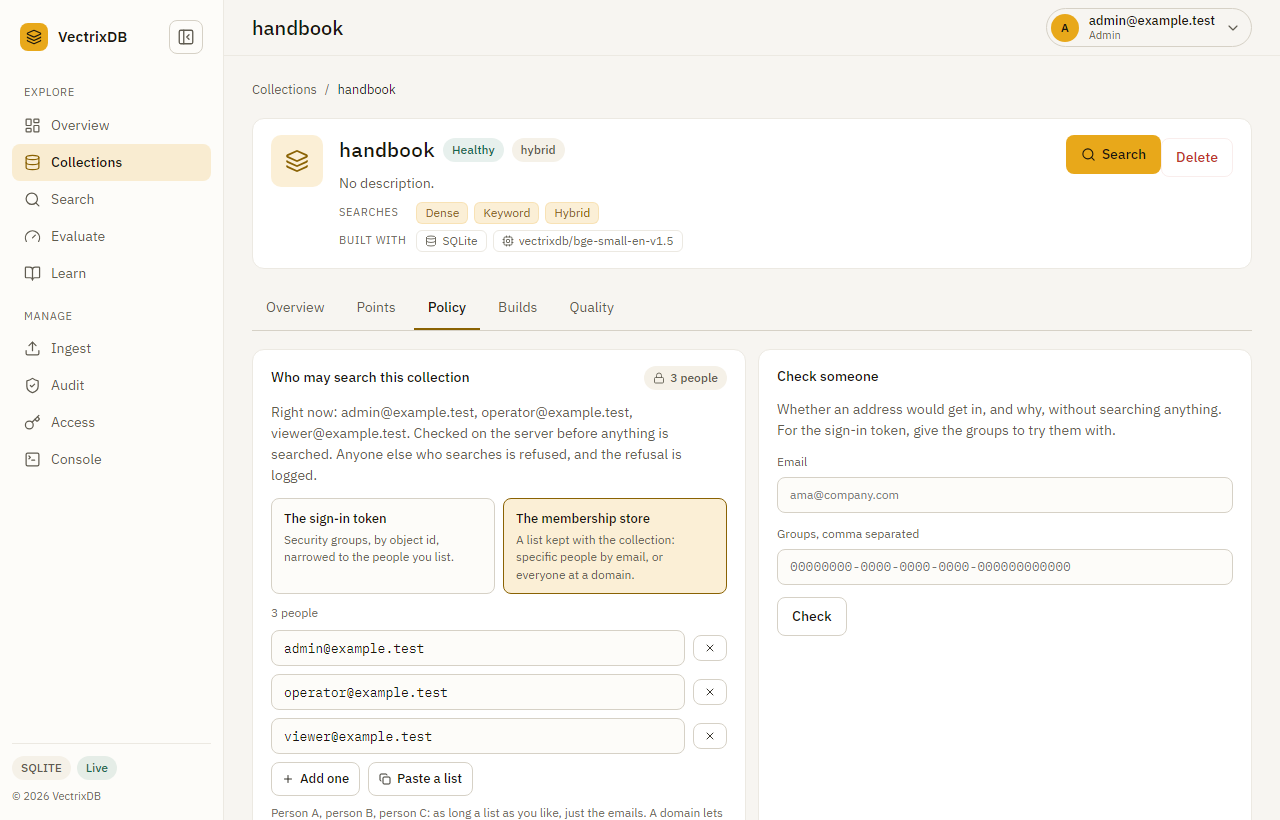
A collection policy says who may search a collection at all: these people by
address, everyone at a domain, or the people on a list who are also in one of
these security groups. Somebody it does not name gets a 403 before anything
in the collection is read. That the collection exists, its name, its size and
its health stay visible to everyone who reaches the server, so the refusal can
say why.
Collection policy or entitlement policy
VectrixDB has two kinds of policy, and a collection can carry both.
| Collection policy | Entitlement policy | |
|---|---|---|
| Decides | Whether this person may search the collection at all | Which documents inside it this person may see |
| Judges | The person's address, or the security groups in their sign-in token | The person's attributes against each document's metadata |
| A refusal | 403 for the whole collection, with the reason |
Documents left out of the results, with nothing said |
| Kept | In the collection's record, in the collection store every server reads | With the collection, declared in code |
| Set by | An admin, on the Policy tab or with PUT /api/v1/collections/{name}/policy |
Whoever builds the collection, with Policy([...]) |
| Recorded | In the access log, as denied |
In the audit trail, one record a search, when an audit store is set |
The collection policy is the door. The entitlement policy decides document by document once somebody is through it. Entitlements are in Restrict what a search can see; this page is about the door.
Turn it on
Policies are kept in each collection's record, and the records live in one store that every server reads, so a rule set on one server is the rule on all of them.
export VECTRIXDB_COLLECTION_STORE=postgresql://vectrix@db.example.com/vectrixdb
export VECTRIXDB_COLLECTION_STORE_KEY_FILE=/run/secrets/collection-store-password
VECTRIXDB_COLLECTION_STORE |
Where the records are |
|---|---|
a path, or sqlite:///<path> |
A file, for one server |
postgresql://<user>@<host>/<database> |
PostgreSQL, for several servers: the postgres extra |
cosmos://<account>.documents.azure.com/<database>/<container> |
Azure Cosmos DB: the azure extra |
dynamodb://<table>?region=<region> |
Amazon DynamoDB: the aws extra |
The password or account key goes in VECTRIXDB_COLLECTION_STORE_KEY, or the
file VECTRIXDB_COLLECTION_STORE_KEY_FILE names, and never in the address.
Left empty, a cloud store uses the managed identity.
Left unset, nothing is gated, and the server serves collections as it always has. Once it is set, the check fails closed:
- A collection with no record answers nobody.
- A record with no policy answers nobody. The Collections page says the collection is unavailable to anyone until an admin sets one.
- Deleting a collection deletes its record, so one made again under the same name answers nobody until a policy is set.
Two ways to name people
A list kept with the collection
store names people by work email, one each, as many as you like, and a
domain for everyone at it. It is matched against the address the person signed
in with.
{"method": "store", "allow": [
  {"email": "ada@example.com"},
  {"email": "grace@example.com"},
  {"domain": "northwind.example"}
]}
Each entry is an email or a domain, never both. Addresses are compared in lower case, and an entry listed twice counts once.
Security groups, narrowed to a list
token names security groups by their object id at the identity provider,
which is what the provider signs into the person's token, and a list of people
beside them. A person must be in one of the groups and on the list.
{"method": "token",
 "allow": [{"id": "6f1c2a9e-0101", "name": "Finance"}],
 "people": [{"email": "ada@example.com"}, {"email": "grace@example.com"}]}
The name beside an id is for the people reading the list. The list is never
optional: not everyone in a security group should search every collection the
group can reach, so a group alone is refused where it is written, and a record
with groups and no list reads as nobody. The list names people by email, never
by domain, since a domain would let everyone in the group at it search.
Set a policy
On the dashboard, open the collection and its Policy tab. Every save asks for a check from the last ten minutes; see Confirm it's you.
Over the API, with a role that holds collection.share, which is an admin:
curl -s -X PUT https://vectors.example.com/api/v1/collections/contracts/policy \
  -H "api-key: $ADMIN_KEY" -H 'content-type: application/json' \
  -d '{"policy": {"method": "store", "allow": [{"email": "ada@example.com"}, {"domain": "northwind.example"}]}}'
{"ok": true, "data": {"policy": {"method": "store", "allow": [{"email": "ada@example.com"}, {"domain": "northwind.example"}]}}}
{"policy": null} sets it back to nobody. A policy that cannot be read, such
as a token policy with no people, is a 400 that says what is wrong. On a
server with no collection store the route answers 404 and names
VECTRIXDB_COLLECTION_STORE. Every change is a policy_changed line in the
access log, with who made it and the new policy in words.
What it gates
Only reading what is in the collection:
| Action | Gated |
|---|---|
search |
yes |
content.index: listing chunk ids and sources |
yes |
content.read: opening a chunk |
yes |
document.read: opening a whole document |
yes |
| Seeing the collection, its size, health and builds | no |
| Writing to it, rebuilding it, deleting it | no, the role decides |
A refusal is a 403 whose data carries code, collection, and policy,
the method that refused. The message says why in words, such as
ada@example.com is not on the list for contracts.
code |
Allowed | Means |
|---|---|---|
on_list |
yes | The address, or its domain, is on a store list |
in_token |
yes | In one of the groups and on the list |
host_key |
yes | The server's own VECTRIXDB_API_KEY |
key_scoped |
yes | A named key made for this collection |
no_policy |
no | The collection has no policy yet |
not_signed_in |
no | A guest, or nobody |
not_on_list |
no | Not on the list, or in a group and not on its list |
not_in_token |
no | The token names none of the groups, or no groups at all |
key_not_scoped |
no | Any other key, the read-only key included |
A key is nobody in particular, so a policy cannot judge it by address. Make a key for the collection instead; see Keys and roles.
With sign-in on, every refusal is a denied line in the access log, with the
code as its reason.
Check someone
Check someone on the Policy tab, or POST /api/v1/access/check, runs the
same decision for an address without searching anything, so a policy can be
tried before anybody signs in. It needs access.check, an admin's.
curl -s -X POST https://vectors.example.com/api/v1/access/check \
  -H "api-key: $ADMIN_KEY" -H 'content-type: application/json' \
  -d '{"collection": "contracts", "email": "grace@example.com", "groups": ["6f1c2a9e-0101"]}'
{"ok": true, "data": {"collection": "contracts", "allowed": true, "code": "in_token",
  "because": "grace@example.com is in Finance and on the list, which may retrieve from contracts",
  "method": "token"}}
groups stands in for the token. A store policy reads the address alone.
Each check is an access_checked line in the access log.
See every collection's policy
GET /api/v1/policies answers for every collection: its method and how many
people, domains and groups it names. A person signed in also gets the policy
itself; a guest gets the counts alone. gated says whether the server has a
collection store at all.
GET /api/v1/collections/{name}/policy is something else: the collection's
entitlement policy, its rules and fingerprint. See
Restrict what a search can see.
When the store cannot be read
A record read is used for thirty seconds before the store is asked again, so a
search is not a round trip to the database. When the store cannot be read, the
copy read earlier stands in, however old, and the failure is logged. With no
copy held, the request is a 503, to try again: the server never takes a
store it cannot read as a yes or as a no.
See also
- Restrict what a search can see: which documents a person may see once they are in.
- Keys and roles: who may set a policy, and how keys meet one.
- Sign people in: where the address and the groups come from.
- Use the dashboard: the Policy tab.