Run it in containers
Every release publishes three images to GitHub's container registry, for Intel and ARM, built from the same wheel PyPI has and checked before they are tagged:
| Image | What it runs | Port |
|---|---|---|
ghcr.io/knowusuboaky/vectrixdb:2.2.0 |
The server: the REST API, the dashboard and MCP at /mcp, with the English embedding model and reranker inside |
7337 |
ghcr.io/knowusuboaky/vectrixdb:2.2.0-full |
The same server with the multilingual embedding model and reranker as well, for collections in the hundred-odd languages besides English | 7337 |
ghcr.io/knowusuboaky/vectrixdb-extract:2.2.0 |
The extraction service: scans, pictures, recordings, videos and YouTube addresses in, text out | 7338 |
2.2.0 is that release, 2.2 the newest 2.2 release, and latest the newest
of all (full for the multilingual server). A release's tags can move to a
rebuild that picks up a security fix, so pin a digest where what runs must
never change; see Verify an image.
Both images hold to the same rules:
- Nothing runs as root. The user is 10001 in group 0, so a platform that picks its own user id, OpenShift for one, can still write the data.
- The root filesystem can be read-only. Everything written goes to
/data, the one volume, or to/tmp. - Nothing is downloaded at run time. The models are inside the image, which is what an air-gapped or egress-controlled network needs.
- Neither starts open. The server will not listen without
VECTRIXDB_API_KEY, its_FILEtwin or sign-in, and a read needs the key like everything else. The extraction service will not start without a key either, because every call to it can spend money on a paid reader. - A stop is clean. A small init runs first, so a stop signal reaches the server and the requests in flight finish.
- No known vulnerability with a fix. Each image is scanned as it is built and every week after; see What is scanned.
On one machine, with Docker Compose
From a checkout, or with docker/compose.yaml and docker/compose.tracing.yaml
downloaded into a folder of their own:
cd docker
python -c "import secrets; print(secrets.token_urlsafe(32))" > vectrixdb.key
sudo chown 10001 vectrixdb.key && sudo chmod 400 vectrixdb.key
docker compose up -d --wait
The dashboard is at http://localhost:7337, on this machine only, and asks for
the key in vectrixdb.key. A call sends it in the api-key header. Put a proxy
that terminates TLS in front of the server before opening it to a network.
An assistant connects at http://localhost:7337/mcp with a key the dashboard
makes it, and searches as that key: see
Connect an assistant over MCP. VECTRIXDB_MCP=0 turns the
endpoint off.
The containers run as user 10001 and read the key through a bind mount, which
keeps the file's owner and permissions, so on Linux the file must be readable
by that user: the chown gives it to that user and the chmod keeps it from
the machine's other users. On Docker Desktop, for Windows and macOS, leave out
the sudo line; the file is shared into the containers readable. VECTRIXDB_KEY_FILE names a
key kept somewhere else, and VECTRIXDB_HOST_PORT publishes the server on
another port than 7337.
Then send the server a scan. It hands the picture to the extraction service, keeps the text it gets back and indexes it:
KEY="$(cat vectrixdb.key)"
curl -X POST http://localhost:7337/api/v1/collections -H "api-key: $KEY" \
  -H 'Content-Type: application/json' -d '{"name": "scans", "dimension": 384}'
curl -X POST http://localhost:7337/api/v1/collections/scans/documents -H "api-key: $KEY" \
  -H "X-Filename: invoice.png" -H "Content-Type: image/png" --data-binary @invoice.png
curl -X POST http://localhost:7337/api/v1/collections/scans/text-search -H "api-key: $KEY" \
  -H 'Content-Type: application/json' -d '{"query_text": "invoice total", "limit": 3}'
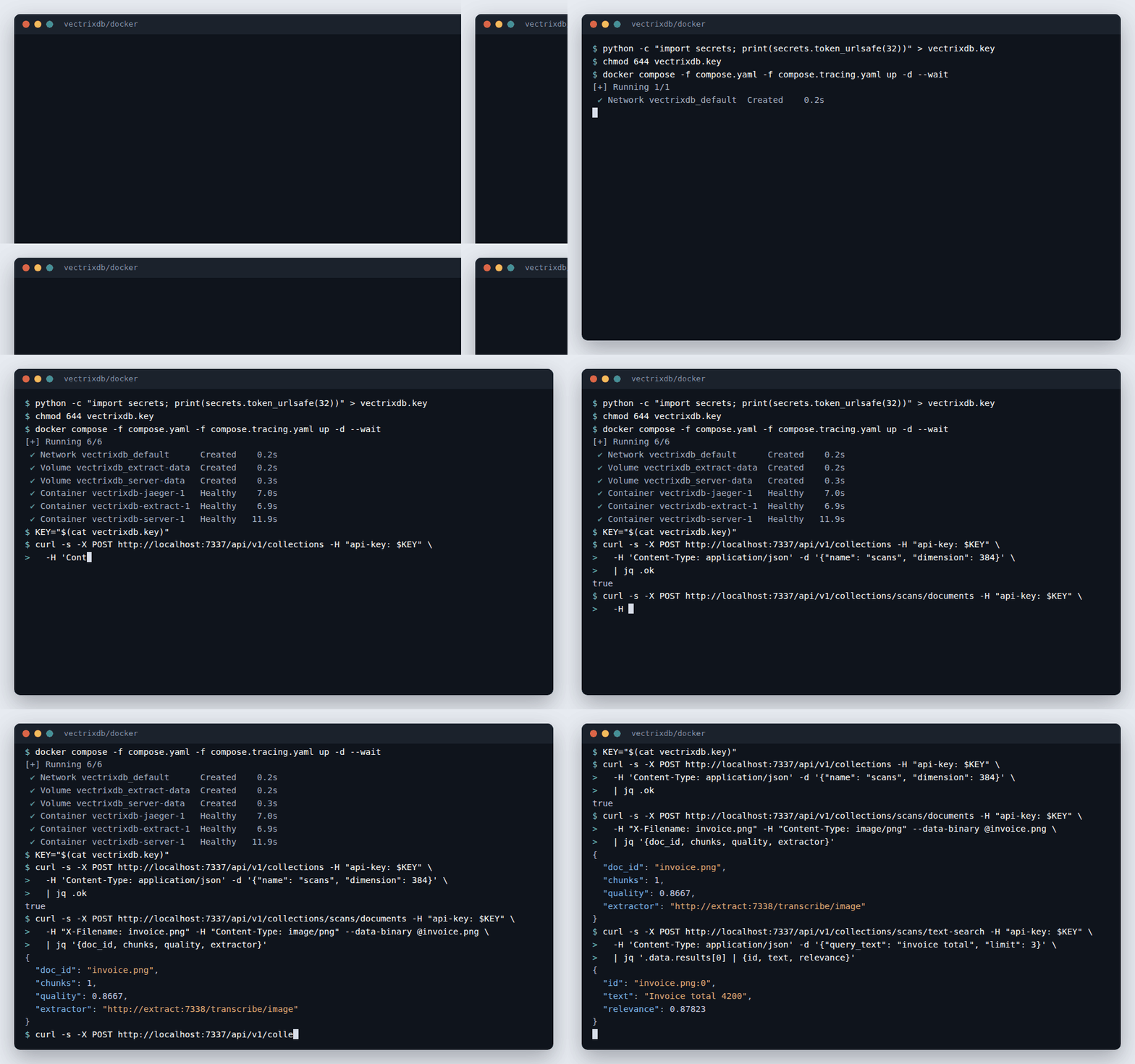
The extraction service is not published on the machine. Only the server reaches it, on the network Compose makes for the two, with the same key. PDFs with a text layer, Word and Excel files are read by the server itself; see Run an extraction service for what goes where.
docker compose down stops both and keeps the collections, which live in named
volumes. docker compose down --volumes deletes them as well.
See each search as a trace
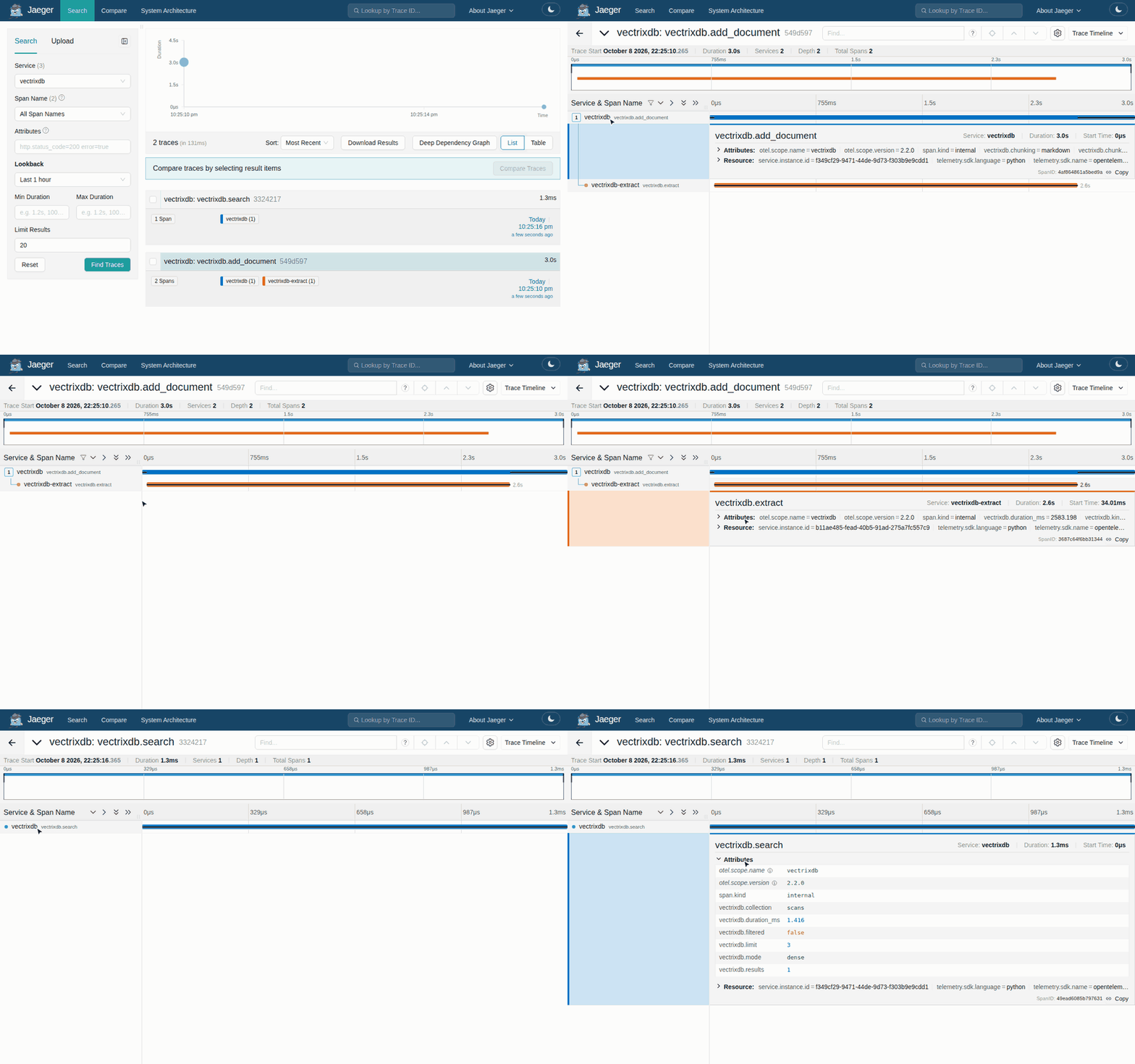
Jaeger starts beside the two, and the server sends it a span for every search,
document added and evaluation run. Jaeger's page is at http://localhost:16686:
pick the vectrixdb service to see each search, how long it took, which mode
ran, how many results it found and how well the best one scored. A scan you
upload is one trace across both containers, with the extraction service's
reading inside the upload. A span never carries the query, the document, its
name or the key. See
Trace searches and ingestion for every span and attribute, and for
sending them to a collector you already run.
On Kubernetes
docker/kubernetes is a Kustomize setup: the server with its collections on a
volume of its own, the extraction service beside it, and a network policy that
lets only the server call the extraction service.
kubectl create namespace vectrixdb
kubectl -n vectrixdb create secret generic vectrixdb-key \
  --from-literal=api-key="$(python -c 'import secrets; print(secrets.token_urlsafe(32))')"
kubectl -n vectrixdb apply -k "https://github.com/knowusuboaky/VectrixDB//docker/kubernetes?ref=v2.2.0"
kubectl -n vectrixdb port-forward service/vectrixdb 7337:7337
The dashboard is then at http://localhost:7337, and every call takes the key in
the vectrixdb-key secret. A company that keeps its secrets in Vault, Azure
Key Vault or AWS Secrets Manager fills that secret with the External Secrets
Operator or the Secrets Store CSI driver instead. In a checkout,
kubectl -n vectrixdb apply -k docker/kubernetes applies the same thing.
Every pod meets the restricted Pod Security Standard: no root, no privilege escalation, every capability dropped, the runtime's default seccomp profile and a read-only root filesystem. Neither mounts a service account token, since neither talks to the Kubernetes API. Label the namespace and the cluster holds them to it:
The network policy is kept by a cluster whose network plugin enforces policies,
which Calico, Cilium and the large clouds' plugins do. On OpenShift, which picks
the user itself, remove runAsUser, runAsGroup and fsGroup from the two
deployments; the image's group 0 lets that user write /data.
A Service named vectrixdb
Kubernetes sets variables in every pod for each Service in the namespace, and
the Service named vectrixdb gives VECTRIXDB_PORT=tcp://10.0.0.12:7337 and
others like it. That is why the port the server listens on is
VECTRIXDB_LISTEN_PORT, and the extraction service's
VECTRIXDB_EXTRACT_LISTEN_PORT. The pods here set enableServiceLinks: false
as well, so none of those variables is there. vectrixdb check passes over them
rather than call each one a misspelt setting, and when one lands on a setting
it reads, a Service named vectrixdb-redis setting VECTRIXDB_REDIS_PORT for
one, it says which Service did it and what to change.
The multilingual server, tracing, a digest
The setup runs the English server. For the multilingual one, from a checkout:
cd docker/kubernetes
kustomize edit set image ghcr.io/knowusuboaky/vectrixdb=ghcr.io/knowusuboaky/vectrixdb:2.2.0-full
For production, pin both images by digest, so what runs is what was signed:
kustomize edit set image ghcr.io/knowusuboaky/vectrixdb=ghcr.io/knowusuboaky/vectrixdb@sha256:<digest>
The digest is the Digest: line of
docker buildx imagetools inspect ghcr.io/knowusuboaky/vectrixdb:2.2.0. To
trace, name your collector in OTEL_EXPORTER_OTLP_ENDPOINT in server.yaml
and extract.yaml, where the lines are there to uncomment.
More than one replica
The server keeps its collections on one ReadWriteOnce volume, so it runs one
replica, and an update stops the old pod before the new one starts. More
replicas need state they can share: VECTRIXDB_STORAGE_BACKEND set to
azure_search or cosmosdb for the collections, and a postgresql:// or
cosmos:// address for VECTRIXDB_SIGNIN_STORE and
VECTRIXDB_COLLECTION_STORE. Then raise the replicas and make the strategy
RollingUpdate. See Choose a storage backend.
Settings
Every setting is an environment variable, as anywhere else; see the
settings reference. Secrets arrive as files, the way
Docker and Kubernetes mount them: VECTRIXDB_API_KEY_FILE,
VECTRIXDB_EXTRACTOR_KEY_FILE, and the _FILE twin every secret has. The
images set four themselves:
| Setting | In the image | Why |
|---|---|---|
VECTRIXDB_PATH |
/data |
The one volume |
VECTRIXDB_LISTEN_PORT, VECTRIXDB_EXTRACT_LISTEN_PORT |
7337, 7338 |
The ports the images expose |
VECTRIXDB_OPEN_READS |
0 |
An image listens on every address, so a read needs the key like everything else. 1 gives back the library's open reads |
VECTRIXDB_ACCESS_LOG |
stdout |
The platform keeps what a container writes to its output |
The server fetches the feeds and pages a collection keeps up with, its
sources, itself. On a network whose egress is controlled,
VECTRIXDB_SOURCES_HOSTS keeps it to the hosts you name, the ones the egress
rules let through, and a CronJob refreshes them with one POST.
Check a set of settings with the image itself before it starts anything, with any file a setting names mounted where it says:
It says what a start would refuse and what would surprise you once it runs,
and exits 1 while there is an error, so it can gate a deployment. See
Deploy the server.
Verify an image before it runs
Each image is signed by the workflow that built it, with no key to keep or leak: Sigstore's certificate names the workflow and the branch or tag it ran from, and the signature is written to Sigstore's public transparency log. With cosign 3:
cosign verify ghcr.io/knowusuboaky/vectrixdb:2.2.0 \
  --certificate-identity-regexp '^https://github\.com/knowusuboaky/VectrixDB/\.github/workflows/containers\.yml@refs/(heads/main|tags/v.+)$' \
  --certificate-oidc-issuer https://token.actions.githubusercontent.com
cosign 2.6 and later read the same signature with --new-bundle-format added.
The build's provenance is attested on GitHub as well:
Each image carries its SBOM, every package inside it, and its build provenance, which the signature covers:
docker buildx imagetools inspect ghcr.io/knowusuboaky/vectrixdb:2.2.0 \
  --format '{{ json (index .SBOM "linux/amd64").SPDX }}' > vectrixdb.spdx.json
docker buildx imagetools inspect ghcr.io/knowusuboaky/vectrixdb:2.2.0 \
  --format '{{ json (index .Provenance "linux/amd64").SLSA }}'
An admission controller that checks Sigstore signatures, Kyverno for one, can refuse any image without this one, given the identity and issuer above.
What is scanned
Every image is scanned with Trivy as it is built, and a release is not tagged
while one has a high or critical vulnerability with a fix out. The Debian
packages under Python are brought up to date as an image is built, so a fresh
build has every fix Debian has published. Every week the published images are
scanned again, and what that finds goes to the repository's Security tab: a
finding there means a rebuild would pick up the fix, and a rebuild keeps the
release's tags. Vulnerabilities with no fix yet are not counted, since no
rebuild could change them. trivy image ghcr.io/knowusuboaky/vectrixdb:2.2.0
lists every one.
Unpacked, the server image is about 650 MB, the multilingual one about 950 MB, and the extraction service about 1.2 GB with its speech model. A build fails when one grows a fifth past that, which is what a dependency that drags in something like PyTorch would do.
Build your own
From a checkout:
docker build -f docker/Dockerfile -t vectrixdb .
docker build -f docker/Dockerfile --target extract -t vectrixdb-extract .
docker build -f docker/Dockerfile --build-arg MODELS=all -t vectrixdb:full .
| Build argument | What it does | Default |
|---|---|---|
MODELS |
all adds the multilingual embedding model and reranker to the server, about 280 MB |
empty |
WHISPER_MODEL |
The faster-whisper model the extraction service reads recordings with, put in the image so it reads them with no network. Empty leaves it out, for a deployment that always has Azure Speech | base |
SERVER_EXTRAS |
The extras the server installs | api,signin,mcp,tracing,documents,feeds,azure,aws,postgres,jobs-azure |
EXTRACT_EXTRAS |
The extras the extraction service installs | api,signin,tracing,extract,youtube,ocr-azure,jobs-azure |
PYTHON_IMAGE |
The base image, for a company that keeps its own copies | python:3.12-slim, pinned by digest |
DEBIAN_UPDATES |
0 keeps the base image's packages as they are, for a build that cannot reach Debian |
1 |
Behind a proxy that inspects TLS, hand the build the proxy's certificate with
--secret id=ca,src=company-ca.pem; it is used while the image is built and
never written into it. --build-context wheels=dist builds from a wheel in
dist instead of the checkout, which is how a release builds from the wheel
PyPI has.
| Build secret | What it is | For |
|---|---|---|
ca |
A certificate authority, PEM | a proxy that inspects TLS |
pip |
A pip.conf naming the company's package index, credentials and all |
a build that reaches packages only through JFrog Artifactory, Nexus or the like |
mirrors |
Lines of NAME=value: VECTRIXDB_MODELS_URL, VECTRIXDB_MODELS_TOKEN, HF_ENDPOINT, HF_TOKEN |
MODELS=all and the speech model, fetched from the company's mirror |
Each is mounted for the steps that need it and never written into a layer,
so docker history and the image's SBOM show none of them.
Run it inside your company's registry builds the
images that way, end to end.
Then check what you built the way a release is checked: every container started read-only with every capability dropped, a collection made, filled and searched, data kept across a restart, a platform's own user id, the Kubernetes setup's mounted key and Service variables, an intranet feed kept current while the cloud's metadata address stays out of reach, and the two images together with a scan read, found and traced across both: