What This Agent Does
build_weather_agent() fetches weather data from
OpenWeatherMap and asks an LLM to produce a user-friendly report.
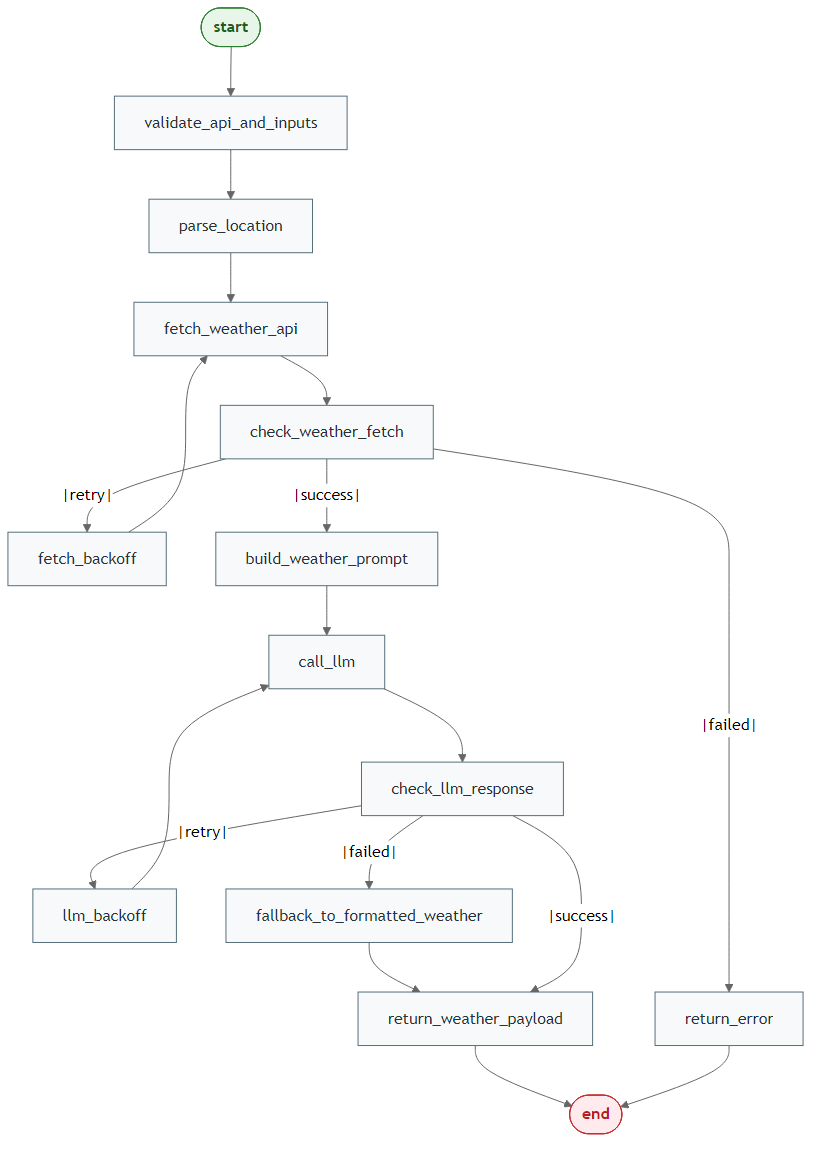
Generate Mermaid PNGs
library(LLMAgentR)

my_llm_wrapper <- function(prompt, verbose = FALSE) "LLM response placeholder"

workflow <- build_weather_agent(
  llm = my_llm_wrapper,
  location_query = "Accra, Ghana",
  weather_api_key = "your-openweathermap-key",
  output = "both",
  direction = "LR"
)

save_mermaid_png(
  x = workflow,
  file = "pkgdown/assets/weather-agent-workflow.png"
)
Step 1: Configure API Key
Sys.setenv(OPENWEATHERMAP_API_KEY = "your-key")Step 2: Call the Agent
library(LLMAgentR)

my_llm_wrapper <- function(prompt, verbose = FALSE) "LLM response placeholder"

result <- build_weather_agent(
  llm = my_llm_wrapper,
  location_query = "Accra, Ghana",
  weather_api_key = NULL,
  units = "metric",
  n_tries = 3,
  backoff = 2,
  endpoint_url = NULL,
  verbose = FALSE
)

str(result)