What This Agent Does
build_sql_agent() generates SQL from user instructions,
executes it, retries on errors, and can explain the final query.
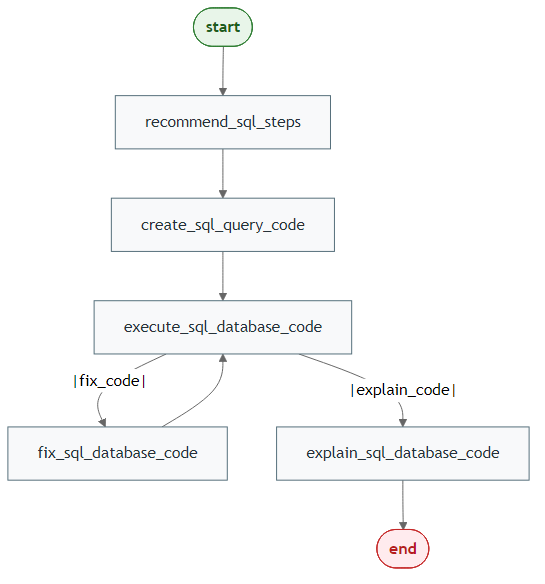
Generate Mermaid PNGs
library(LLMAgentR)

my_llm_wrapper <- function(prompt, verbose = FALSE) "LLM response placeholder"

workflow <- build_sql_agent(
  model = my_llm_wrapper,
  connection = NULL,
  output = "both",
  direction = "LR"
)

save_mermaid_png(
  x = workflow,
  file = "pkgdown/assets/sql-agent-workflow.png"
)
Step 1: Prepare a Database
library(DBI)
library(RSQLite)

conn <- dbConnect(RSQLite::SQLite(), ":memory:")
dbWriteTable(conn, "sales", data.frame(
  region = c("North", "North", "South"),
  amount = c(120, 80, 90)
))
Step 2: Build the Agent
library(LLMAgentR)

my_llm_wrapper <- function(prompt, verbose = FALSE) "LLM response placeholder"

sql_agent <- build_sql_agent(
  model = my_llm_wrapper,
  connection = conn,
  human_validation = FALSE,
  bypass_recommended_steps = FALSE,
  bypass_explain_code = FALSE,
  verbose = FALSE
)