What This Agent Does
build_forecasting_agent() creates a forecasting workflow
with model recommendation, code generation, retries, execution, and
explanation.
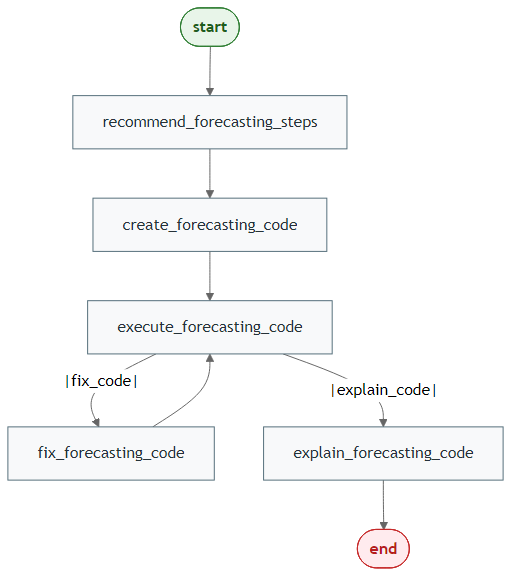
Generate Mermaid PNGs
library(LLMAgentR)

my_llm_wrapper <- function(prompt, verbose = FALSE) "LLM response placeholder"

workflow <- build_forecasting_agent(
  model = my_llm_wrapper,
  output = "both",
  direction = "LR"
)

save_mermaid_png(
  x = workflow,
  file = "pkgdown/assets/forecasting-agent-workflow.png"
)
Step 2: Build and Run the Agent
library(LLMAgentR)

my_llm_wrapper <- function(prompt, verbose = FALSE) "LLM response placeholder"

forecast_agent <- build_forecasting_agent(
  model = my_llm_wrapper,
  bypass_recommended_steps = FALSE,
  bypass_explain_code = FALSE,
  mode = "dark",
  line_width = 3,
  verbose = FALSE
)

initial_state <- list(
  user_instructions = "Forecast value for the next 30 days grouped by id.",
  data_raw = my_data
)

final_state <- forecast_agent(initial_state)
str(final_state)